Extinguisher Scanner app iconExtinguisher Scanner
How it worksFeaturesPricingAboutSupport
Contact SalesDownload on the App Store →
Open navigation menu
How it worksFeaturesPricingAboutSupport
Contact SalesDownload on the App Store →

Fire extinguisher barcode scanner alternative

Fire Extinguisher Tracking Without Barcode Stickers

Scan the extinguisher. Not another sticker.

Extinguisher Scanner reads the existing manufacturer label and automatically fills key extinguisher information for you to review before saving the inspection.

Download on the App Store →See how it works

Scan results may vary. Review captured information before saving.

No separate label rollout

Start with the manufacturer label already on the extinguisher.

Review before saving

Confirm or correct the information captured from the label.

One inspection workflow

Scan the label, inspect the unit, and continue the route.

Two ways to begin

Reduce the setup between the extinguisher and the inspection.

Barcode systems remain useful for durable asset identity and repeat visits. Manufacturer-label scanning changes the first step by using information already printed on the extinguisher.

Examples of platforms with documented barcode / QR workflows

Inspect PointUptickBuildingReports ScanSeriesInspectNTrack

Barcode and QR capabilities vary by platform.

Barcode / QR asset workflow

Add an asset identifier, then scan it.
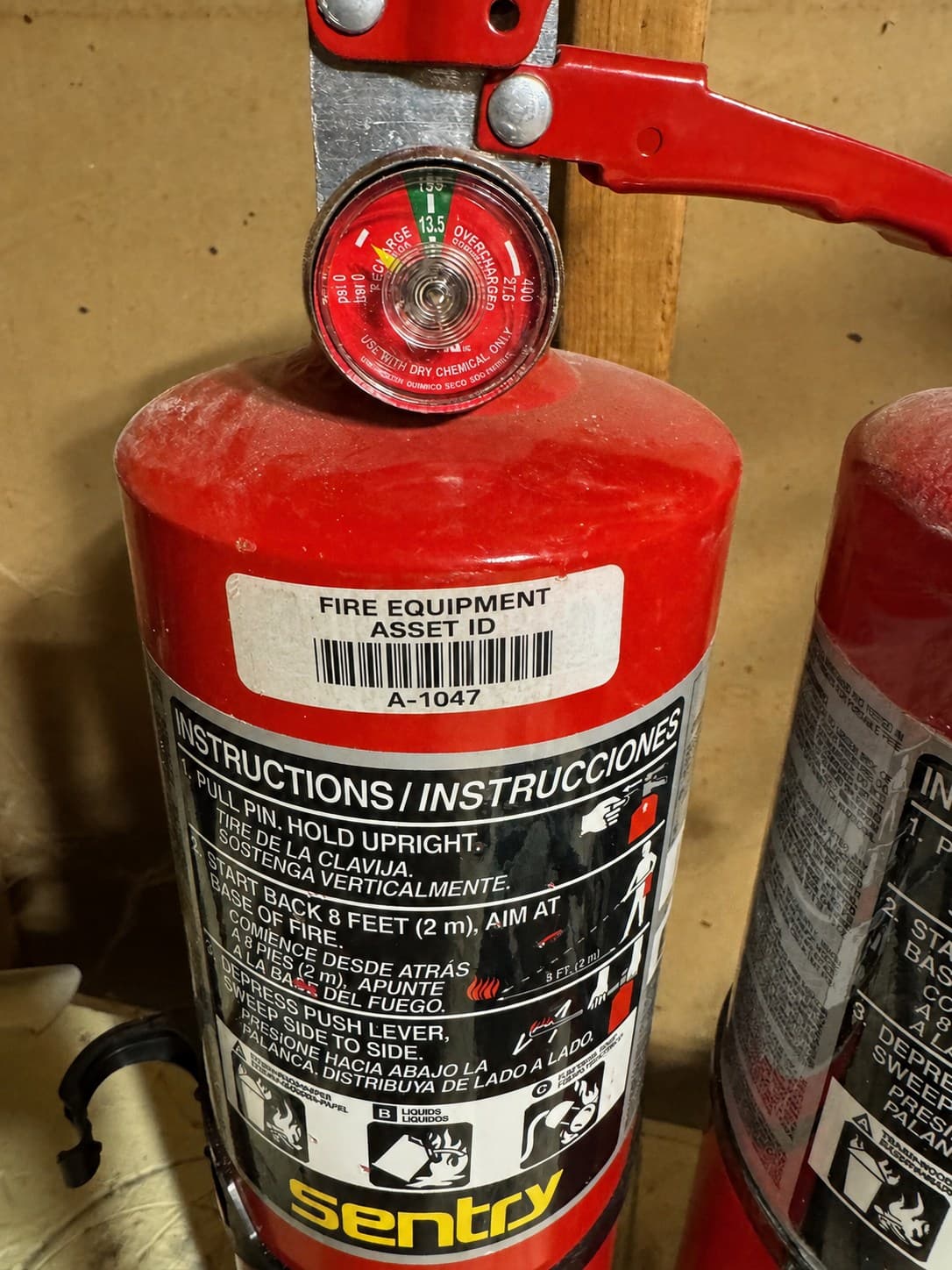
Fire extinguisher with a separately applied barcode asset label
Added asset sticker / QR code

Additional asset label→Scan identifier→Retrieve record

General asset-label example; not associated with any platform listed above.

  1. 01Create or import the equipment record
  2. 02Associate a barcode or QR code
  3. 03Place the label when one is needed
  4. 04Scan the code on future visits
  5. 05Open the linked record and inspect

Exact workflows vary by platform. Some systems also support selected manufacturer-provided codes.

NO EXTRA LABEL NEEDED TO START
Extinguisher Scanner

Manufacturer-label alternative

Begins with information already printed on the extinguisher.

Extinguisher Scanner

Read the label already on the unit

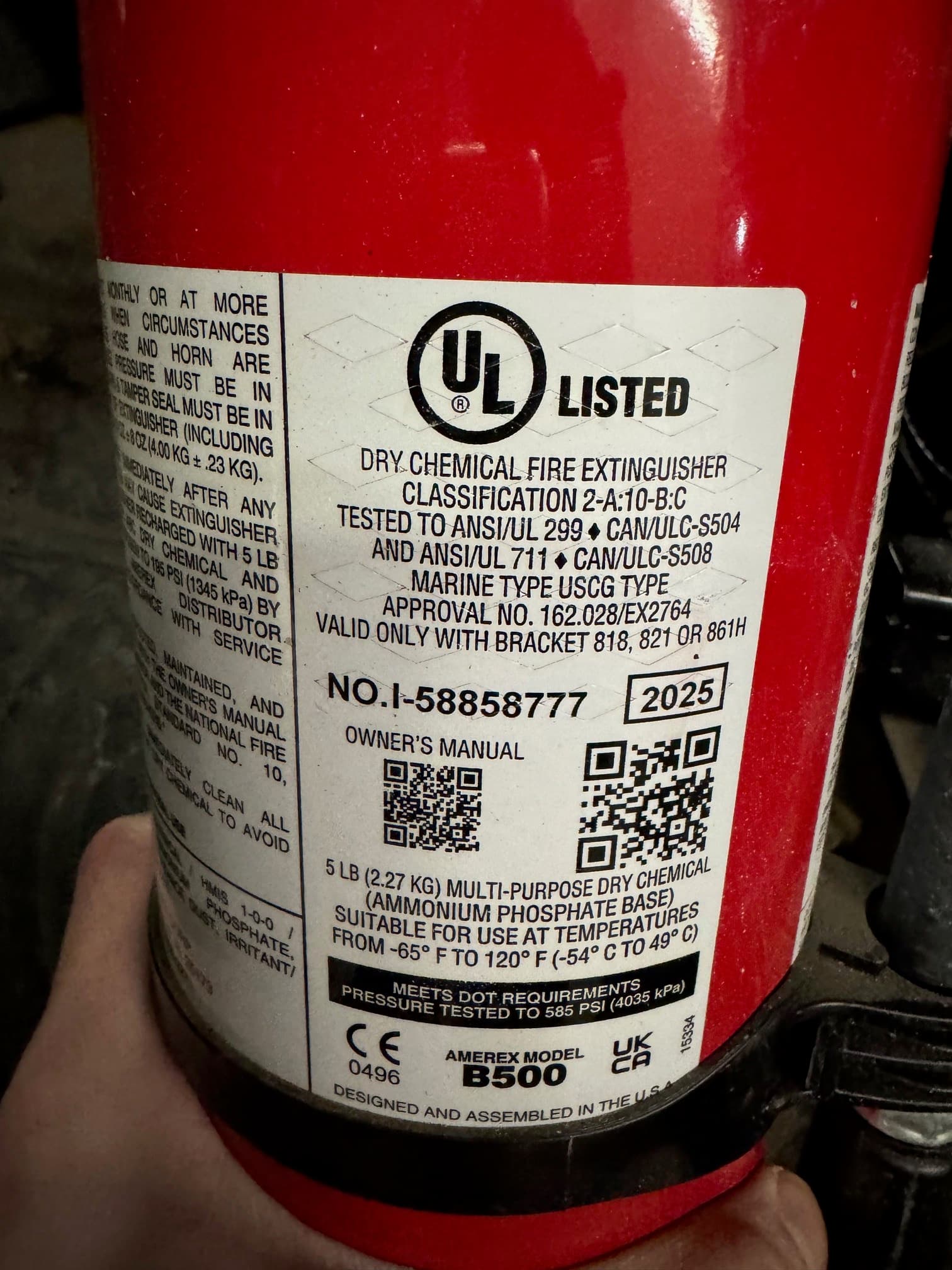
Amerex fire extinguisher manufacturer label with model and equipment information
Existing manufacturer label

Existing manufacturer label→Read printed information→Build inspection draft

  1. 01Point the camera at the manufacturer label
  2. 02Capture information printed on the label
  3. 03Review and correct the draft
  4. 04Inspect and save

Label scanning assists data capture; it does not remove the technician's review step.

Manufacturer-label scanning

Scan the label already on the extinguisher.

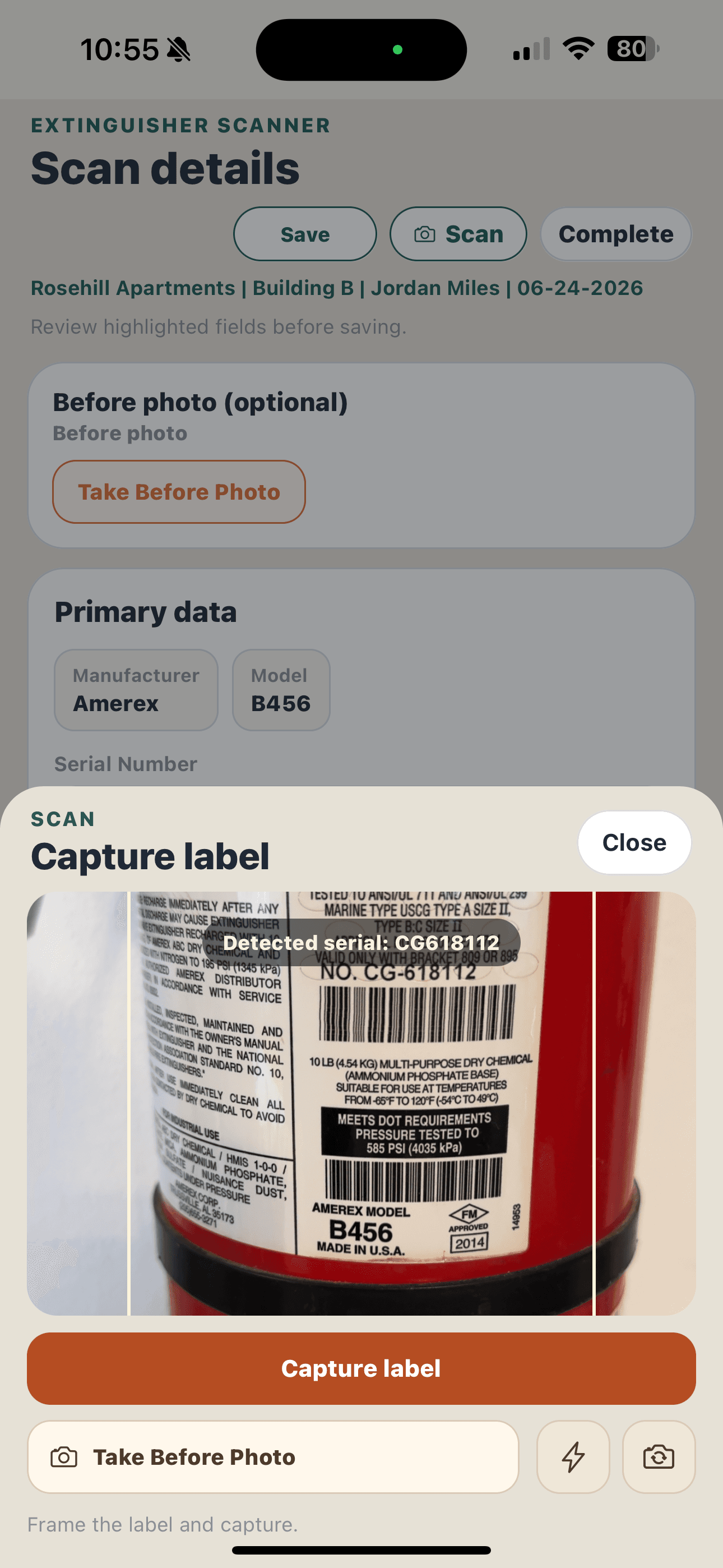
Point the camera at the manufacturer label. Extinguisher Scanner helps fill an editable inspection draft from information it can read on the label.

Extinguisher Scanner uses optical character recognition (OCR) to read visible text from the extinguisher's existing manufacturer label.

✓Manufacturer
✓Model
✓Serial number
✓Manufacture year
✓Extinguisher type
✓Size

The app may return a complete draft, a partial result, or a manual entry prompt. You stay in control of what gets saved.

See the full inspection workflow
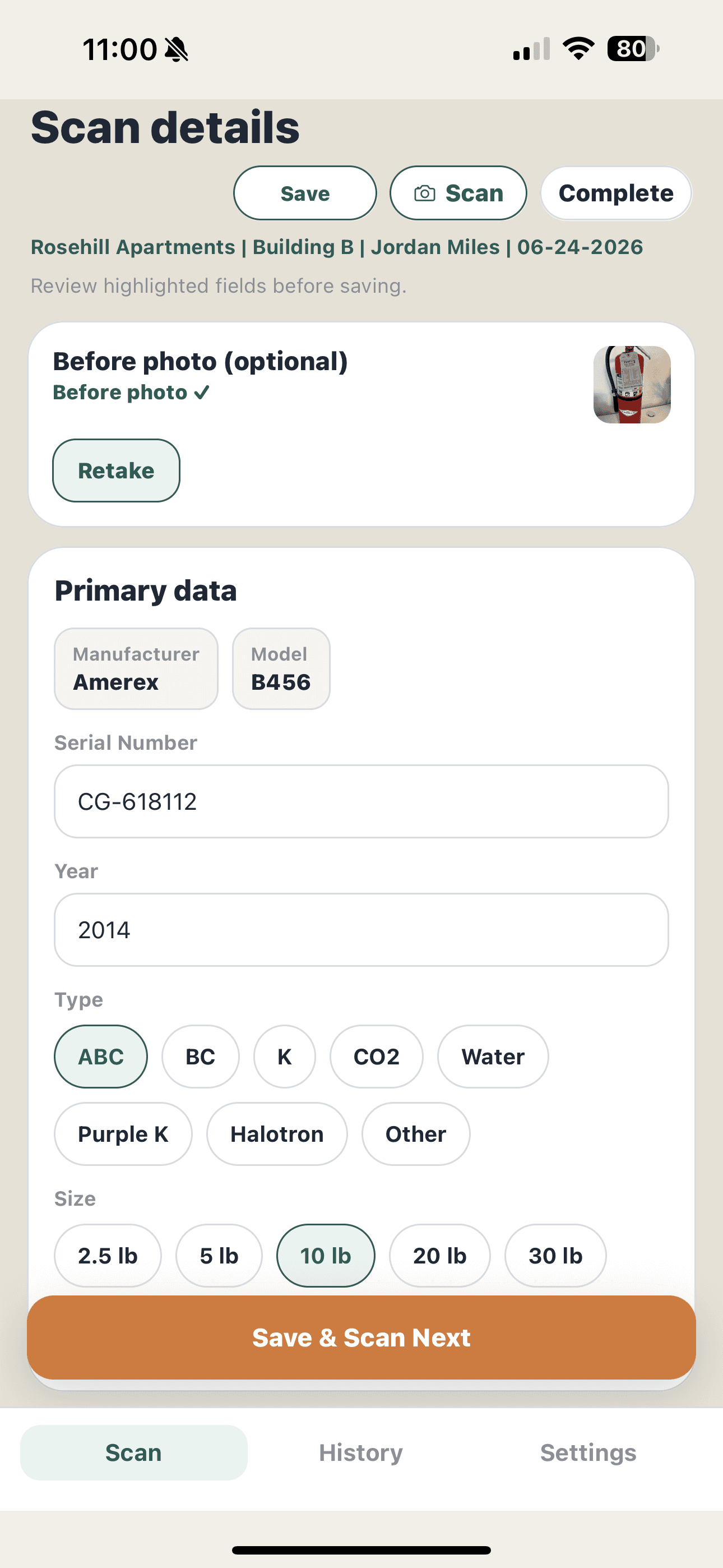
Extinguisher Scanner scan details screen showing editable manufacturer, model, serial number, manufacture year, type, and size
Review the captured details before saving

Barcode scanning vs label scanning

Barcode scanning and manufacturer-label scanning are not the same thing.

A barcode scan decodes a visual identifier. Manufacturer-label scanning uses OCR to read printed words and numbers that can help fill inspection fields.

DimensionBarcode or QR asset trackingManufacturer-label scanning
What gets scannedAn encoded barcode or QR identifier, often associated with an asset record.The printed words and numbers already visible on the manufacturer label.
Separate asset labelCommon in asset workflows, although some systems also accept manufacturer-provided codes.Not needed to begin capturing the printed extinguisher information.
Initial equipment setupUsually involves creating or importing a record and associating its code.Starts with the extinguisher in front of the technician, then creates a reviewable draft.
Data-entry assistanceOpens a linked record or decodes fields when the code contains structured data.Attempts to fill inspection fields from visible label text.
Technician checkConfirm that the code and linked record match the equipment being inspected.Confirm and correct captured values before saving the extinguisher.

How Extinguisher Scanner compares

Code-based identification and printed-label scanning are not the same thing.

The products below all document useful scanning workflows. The distinction is what their public materials say the camera is scanning.

ProductPublicly documented scanning workflowReads printed manufacturer-label text
Extinguisher ScannerReads visible manufacturer-label text and creates a reviewable inspection draft.Documented product capability
Inspect PointOptional barcode and QR scanning, including documented support for codes from several extinguisher brands and a flow for associating a barcode with an asset.Not found in reviewed public documentation
UptickBarcodes, QR codes, and bSecure identifiers can be attached to assets and scanned to locate linked records during field work.Not found in reviewed public documentation
BuildingReports ScanSeriesDocuments a barcode-centered workflow and support for selected manufacturer-applied extinguisher QR codes.Not found in reviewed public documentation
InspectNTrackSupports existing, manufacturer, or newly applied barcodes and QR codes; its documentation says barcode use is optional.Not found in reviewed public documentation

Product capabilities can change. Comparison is based on publicly available product information reviewed September 2026. “Not found” describes the reviewed documentation and does not mean a product lacks the capability.

Why it matters

Keep the technician focused on the unit, not the setup project.

The practical benefit is a shorter path from seeing an extinguisher to documenting the inspection in front of you.

01

Less label setup

Begin with installed extinguishers instead of making a separate asset-label rollout the first step.

02

Less repetitive typing

Use information captured from the label as a starting point, then spend your attention confirming the inspection.

03

A reviewable workflow

See the captured manufacturer, model, serial, year, type, and size before anything is saved.

04

Built for the route

Move from one extinguisher to the next with inspection details and reports kept in the same app.

Review current plans on the pricing page.

FAQ

Fire extinguisher barcode scanning questions.

What is a fire extinguisher barcode scanner?+

It is usually an app or handheld scanner that reads a barcode or QR code associated with an extinguisher. The scan identifies the asset so a technician can open its record, inspect it, and update its history.

Do fire extinguishers already have barcodes?+

Some fire extinguishers already have barcodes or QR codes on the manufacturer label, but not every installed extinguisher has a code that works as an asset identifier for a given platform. Extinguisher Scanner takes a different approach: instead of depending on a barcode, it reads the existing manufacturer label to help capture details such as manufacturer, model, serial number, and manufacture year for review before saving.

Do I need to put barcode stickers on every extinguisher?+

No. You do not need to put barcode stickers on every extinguisher to begin using Extinguisher Scanner. The app starts with the label already on the unit, reading the existing manufacturer label to help capture extinguisher information for you to review and correct before saving. Separate barcode or QR asset labels may still be useful in some record-linking workflows, especially when returning to linked records later, but they are not required to start.

Can an app read a fire extinguisher manufacturer label?+

Yes. Label-scanning software can read printed text from a captured image and use it to suggest equipment fields. Label condition, glare, camera angle, print quality, and layout affect results, so technician review remains important.

Can Extinguisher Scanner read serial numbers?+

Extinguisher Scanner attempts to capture the serial number from the label and places the result in an editable field. Technicians should confirm the value against the extinguisher before saving.

Can Extinguisher Scanner identify the manufacturer and model?+

The app can suggest a manufacturer and model when the label text matches supported patterns and model information. The result is presented for review and can be corrected in the inspection screen.

Is OCR the same as barcode scanning?+

No. Barcode scanning decodes a structured visual code. OCR reads printed characters. Extinguisher Scanner applies that technology to ordinary label text and can use barcode data as a supplement when a supported code is present.

Can I correct information after scanning?+

Yes. Scan results are a draft. You can review and edit the captured details before saving the extinguisher and continuing the inspection.

Start with the label already there

Try a fire extinguisher scanner built for the inspection.

Scan manufacturer-label text, review the result, and keep moving through the route.

Download on the App Store →View pricing
Extinguisher Scanner app iconExtinguisher Scanner

Inspection-first software for fire extinguisher technicians who want to scan labels, document service, and finish reports faster.

Product

How it worksFeaturesPricingAbout

Company

Contact & SupportPrivacy PolicyTerms of UseDelete Accountsupport@extinguisherscanner.com

© 2026 Extinguisher Scanner LLC. All rights reserved.

Built for fire extinguisher technicians.